how do i connect to UNSW-IoT?
 authored by l1mey112

(Want to connect to eduroam instead? See /eduroam)
If you don't want to use eduroam, UNSW-IoT is another option. You may want to do this if you are not interested in aqc4all, or don't want to use the deprecated method of connecting to eduroam.
The issues with iot that you may have patchy reception in some buildings (e.g. Keith Burrows), and that iot isn't officially supported for personal devices.

The way UNSW-IoT works is that you put down your MAC address in an online portal and they provide you a password to connect with. This will not work with setups and operating systems that randomise your MAC address, so ensure you disable these settings :)
See the bottom of the document at #acquire-your-macv4-address to get your MACv4 address, it should look like the string XX:XX:XX:XX:XX:XX where each XX are hex bytes.
-
Go here https://www.unsw.edu.au/myit/services/wifi-network/connecting-to-the-unsw-network/get-online/internet-of-things-device - Click Get online →
-
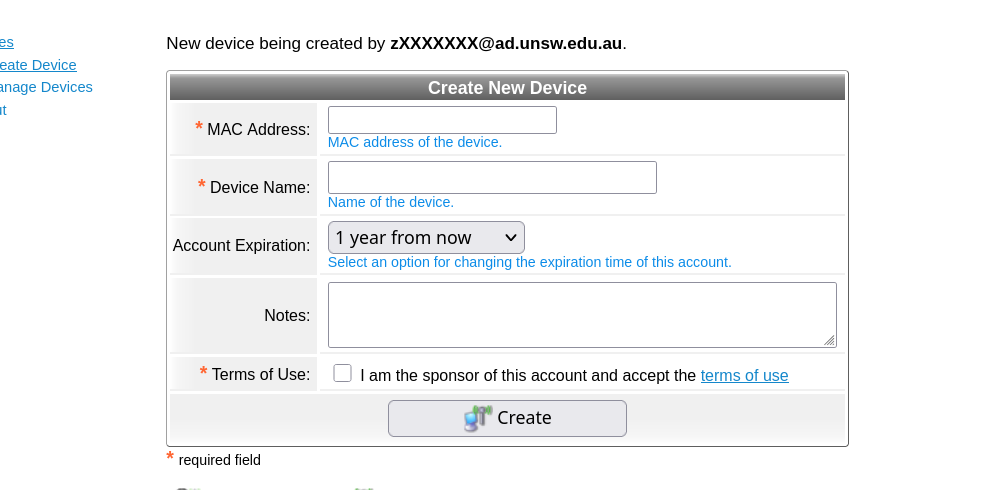
You'll a page simlar to the image below.
-
Type in your MAC address, click create, and you're done!
-
Connect to UNSW-IoT using the password they provide to you, like
iwctl station wlan0 connect UNSW-IoTornmcli device wifi --ask connect UNSW-IoT.
Acquire your MACv4 address
Use ip addr or /proc
Run
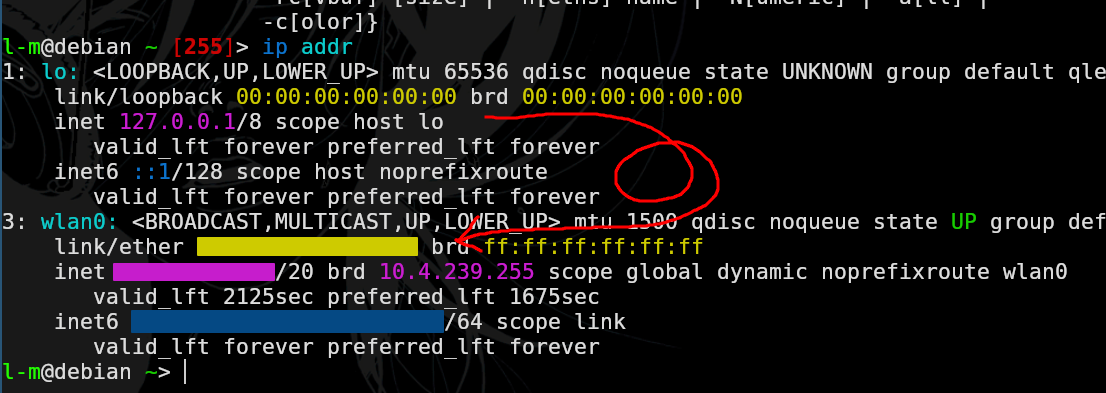
ip addrand extract out the XX:XX:XX:XX:XX:XX for the thing that isn't the loopback, so in my case wlan0. It's censored yellow but you'll know it when you see it.
Otherwise, you can use proc filesystem
cat /sys/class/net/wlan0/address
# XX:XX:XX:XX:XX:XX
iwctl?
# if you are __ALREADY__ connected to some wifi network
# substitute wlan0 with whatever network interface you have
iwctl station wlan0 show
#
#            ....
#            Connected network     ???
#            IPv4 address          ??.??.??.??
#            ConnectedBss          XX:XX:XX:XX:XX:XX
#            ....
#            ....
#            ....